
Module 1: Introduction to Active Directory in Microsoft Windows Server
Active Directory (AD) is a directory service developed by Microsoft for Windows domain networks. It is a core component for managing users, computers, and other resources within a networked environment.
What is Active Directory (AD)?
Active Directory is a centralized database that provides:
Authentication (user login verification)
Authorization (access control to resources)
Directory services (information on network objects)
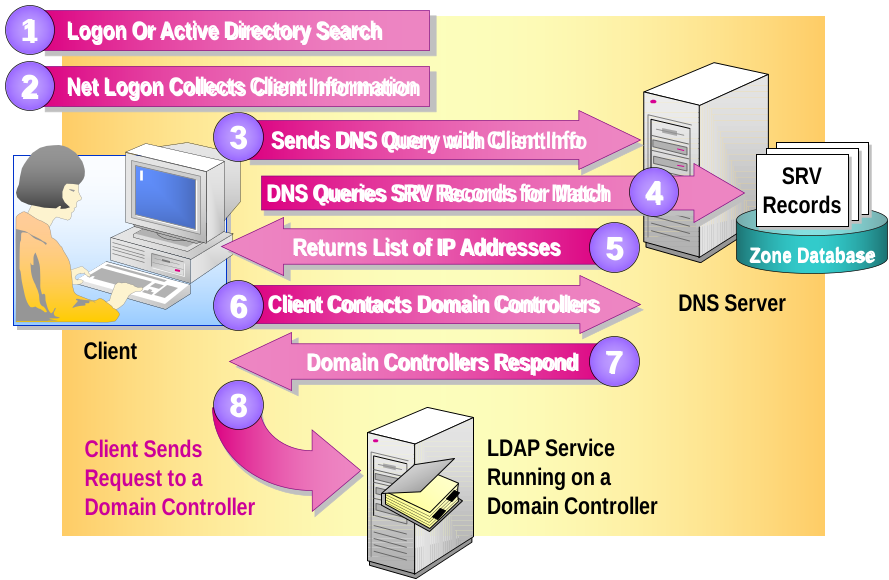
It uses LDAP (Lightweight Directory Access Protocol) for communication and supports a hierarchical structure of domains, trees, and forests.
Introduction to Active Directory
Active Directory (AD) is a directory service developed by Microsoft to manage and organize network resources such as users, computers, printers, and groups within a Windows domain-based network.
What Does Active Directory Do?
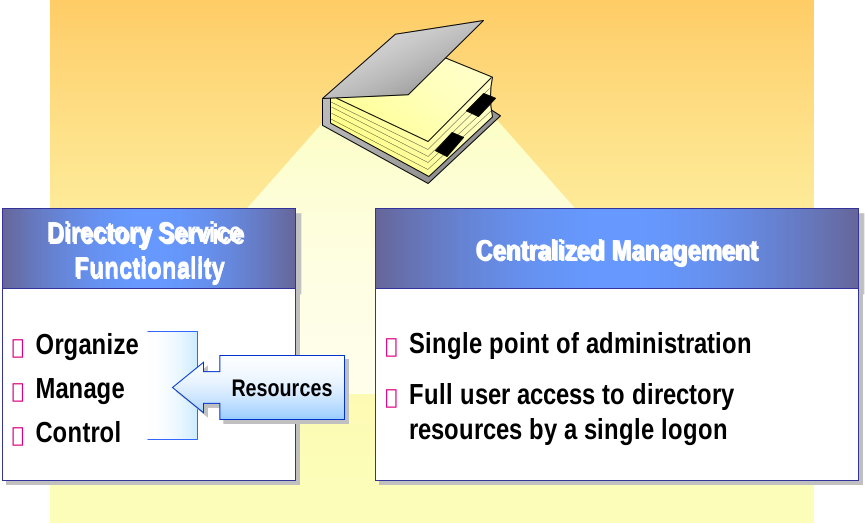
Active Directory acts like a centralized database that helps network administrators:
Authenticate users and devices
Authorize access to files, applications, and resources
Organize users and resources logically
Apply security policies and updates across the network
- What Is Active Directory?
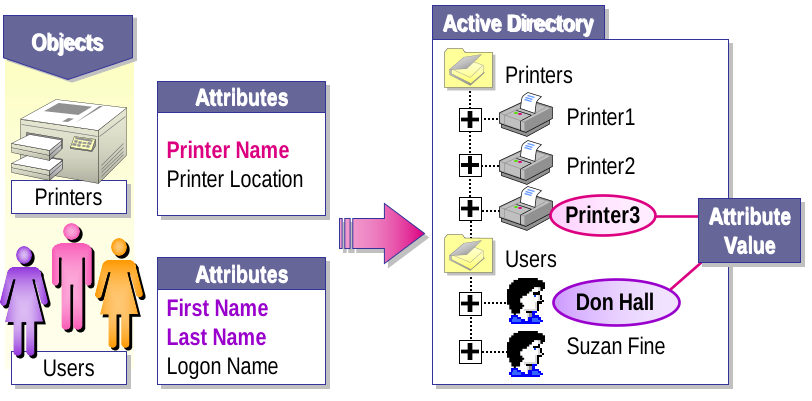
- Active Directory Objects
- Objects Represent Network Resources
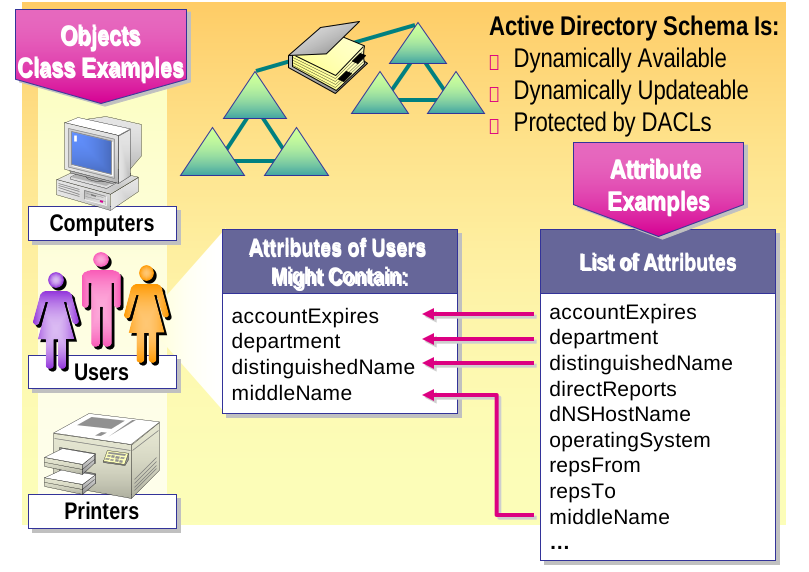
- Attributes Store Information About an Object
- Active Directory Schema
- Lightweight Directory Access Protocol (LDAP)
- LDAP Provides a Way to Communicate with Active Directory by Specifying Unique Naming Paths for Each Object in the Directory
- LDAP Naming Paths Include:
- Distinguished names

- Relative distinguished names
Active Directory Logical Structure
The logical structure of Active Directory (AD) defines how resources are organized and managed within a network—independent of their physical location. This makes AD scalable, flexible, and easier to administer.
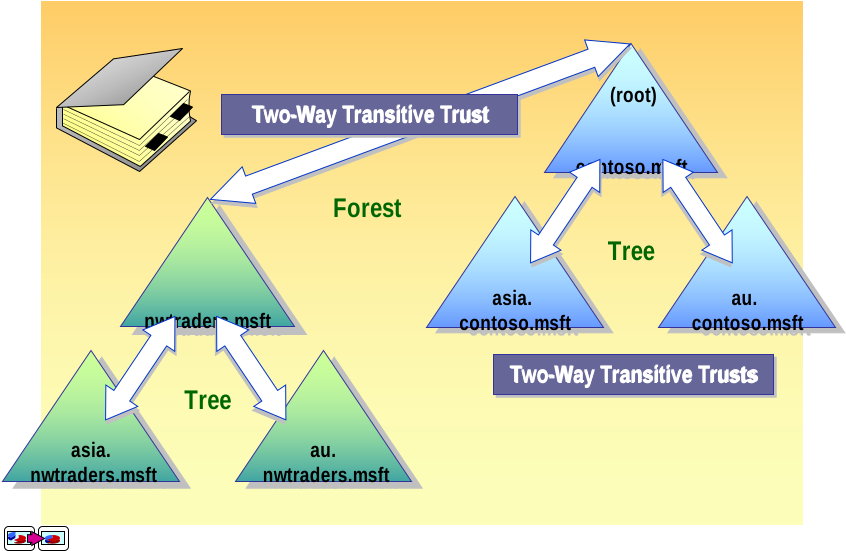
1. Forest
The top-most logical container in AD.
Represents the security boundary.
Can contain one or more domain trees that share a common schema and global catalog.
Key Point: All domains in a forest trust each other automatically.
2. Tree
A collection of domains that share a contiguous namespace (e.g.,
company.com,hr.company.com).Domains in a tree are linked via transitive trust.
Key Point: Trees allow hierarchical structuring of domains.
3. Domain
The basic unit of organization in AD.
Contains objects like users, groups, computers, etc.
Shares a single database and security policies.
Each domain has its own Domain Controller(s).
Example: sales.company.com, it.company.com.
4. Organizational Units (OUs)
Sub-containers within a domain.
Used to organize users, groups, and devices logically.
Group Policies can be applied at the OU level.
Delegation of administration is possible at the OU level.
Example: HR, Finance, IT, etc., within company.com.
5. Objects
Everything stored in AD is an object.
Common types include:
Users
Computers
Groups
Printers
Shared folders
Each object has attributes (e.g., a user object has name, email, password).
- Domains
- A Domain Is a Security Boundary
- A domain administrator can administer only within the domain, unless explicitly granted administration rights in other domains
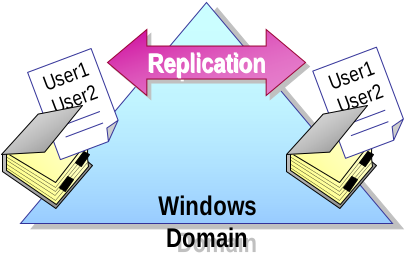
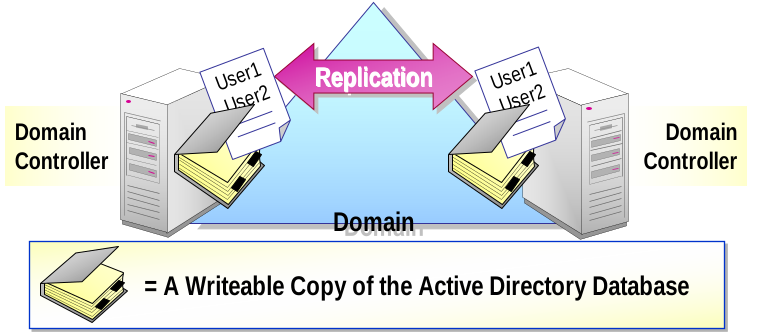
- A Domain Is a Unit of Replication
- Domain controllers in a domain participate in replication and contain a complete copy of the directory information for their domain
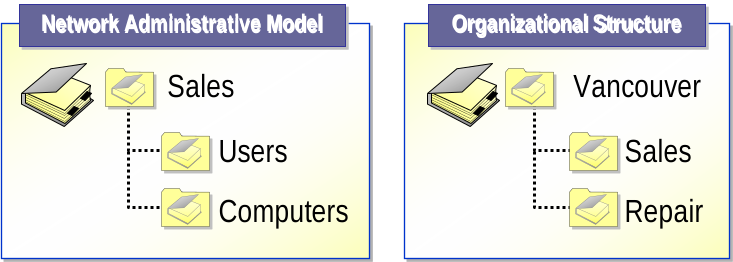
- Organizational Units
- Use OUs to Group Objects into a Logical Hierarchy That Best Suits the Needs of Your Organization
- Delegate Administrative Control over the Objects Within an OU by Assigning Specific Permissions to Users and Groups
- Trees and Forests
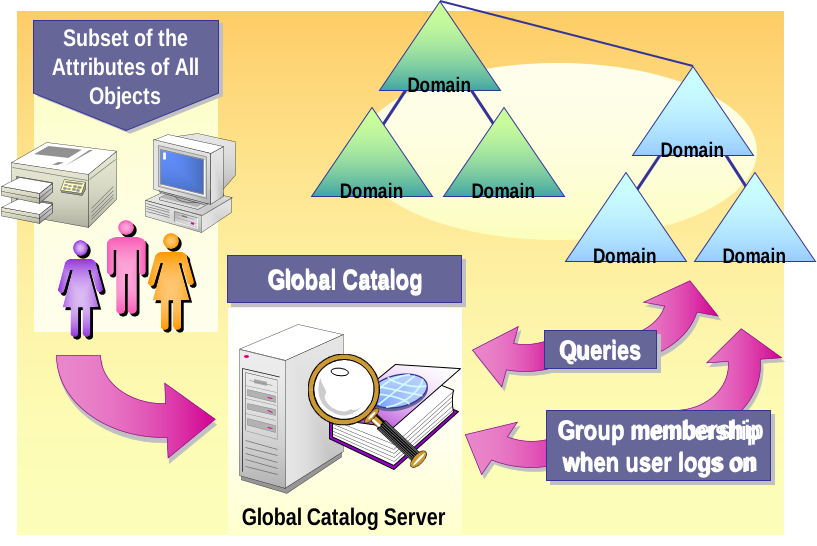
- Global Catalog
Active Directory Physical Structure
The physical structure of Active Directory (AD) defines how the infrastructure is implemented in the network — based on actual hardware, sites, and network topology. It’s used primarily to control replication traffic and authenticate users efficiently across geographical locations.
1. Domain Controllers (DCs)
Servers that store a copy of the Active Directory database.
Authenticate users, enforce policies, and replicate data with other DCs.
Every domain must have at least one Domain Controller.
Key roles may include:
Primary Domain Controller Emulator (PDCe)
RID Master
Infrastructure Master
Schema Master
Domain Naming Master
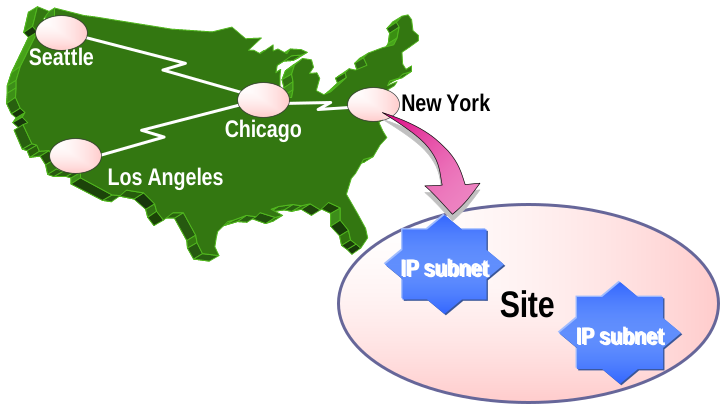
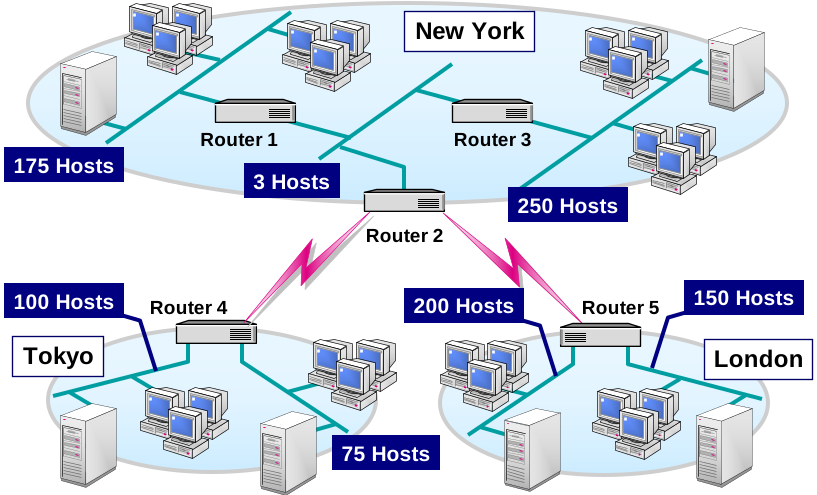
2. Sites
Represents physical/geographical locations with good network connectivity.
Sites are not tied to domains. One site can contain DCs from multiple domains and vice versa.
Helps control replication traffic and optimize logon performance.
Example:
Site 1: New York
Site 2: London
Site 3: Karachi
3. Site Links
Define how replication happens between different sites.
Can be customized by schedule, cost, and transport (e.g., IP or SMTP).
Lower cost = preferred route for replication.
4. Global Catalog Servers
A Domain Controller that stores a partial replica of every object in the forest.
Speeds up searches and logon across domains.
Typically, one GC server is placed in every site.
5. Replication Topology
Intra-site replication: Fast, frequent, and not compressed (within same site).
Inter-site replication: Scheduled, compressed, and occurs over site links.
Helps reduce WAN traffic between sites.
- Domain Controllers
- Participate in Active Directory replication
- Perform single master operations roles in a domain
- Sites
- Optimize replication traffic
- Enable users to log on to a domain controller by using a reliable, high-speed connection
Methods for Administering a Windows Server Network
Administering a Windows Server network involves using various tools and techniques to configure, monitor, manage, and secure resources across a domain or enterprise environment. Below are the main methods used by administrators:
Windows Admin Center (WAC)
A web-based management platform introduced in Windows Server 2019 and 2022.
Features:
Manage servers remotely via browser
View performance metrics
Manage storage, virtual machines, roles, and features
Works without needing RDP or PowerShell remoting
Remote Desktop (RDP)
Provides full graphical access to a remote Windows server.
Uses:
Perform tasks as if physically on the server
Common for GUI-based management
Can be secured using RDP Gateway or VPN
Group Policy (GPO) Management
Administrators use GPOs to centrally enforce settings and policies across users and computers.
GPO Examples:
Password policies
Software installation
Firewall and security settings
Desktop environment restrictions
Task Scheduler & Services Console
Task Scheduler: Automate tasks like backups, updates, or reporting.
Services.msc: View and manage Windows services (start, stop, set startup type).
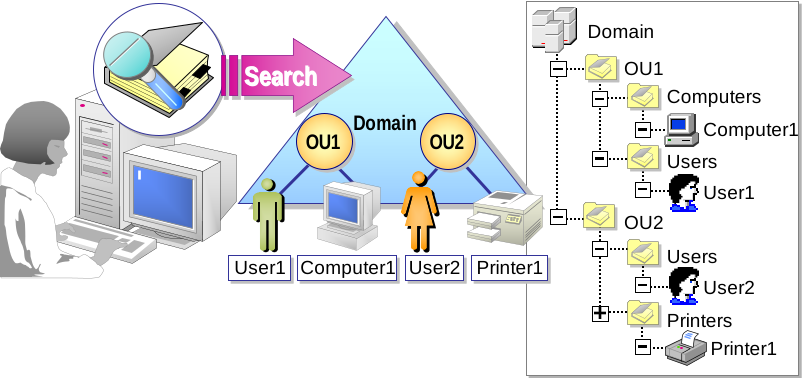
- Using Active Directory for Centralized Management
- Enables a single administrator to centrally manage resources
- Allows administrators to easily locate information
- Allows administrators to group objects into OUs
- Uses Group Policy to specify policy-based settings
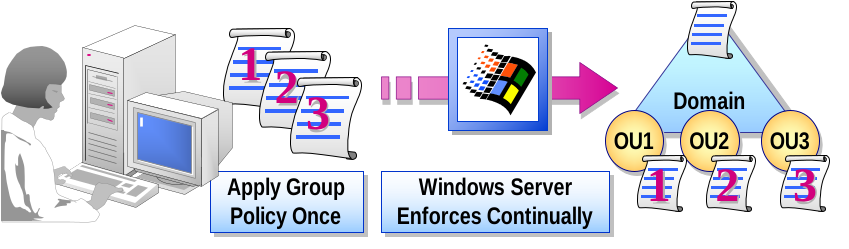
- Managing the User Environment
- Control and lock down what users can do
- Centrally manage software installation, repairs, updates, and removal
- Configure user data to follow users whether they are online or offline
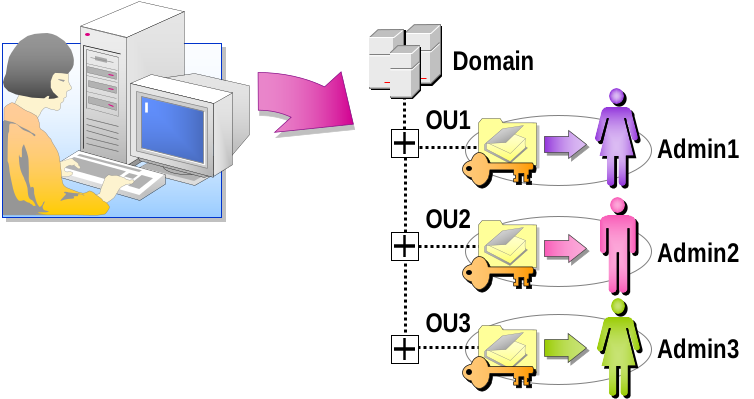
- Delegating Administrative Control
- Assign Permissions:
- For specific OUs to other administrators
- To modify specific attributes of an object in a single OU
- To perform the same task in all OUs
- Customize Administrative Tools to:
- Map to delegated administrative tasks
- Simplify interface design
Add comment